SHERER ARCHITECTS

Categories
Uncategorized

Master ‘construction documentation management’ for Efficient Projects

Managing construction documents is more than just digital housekeeping. It's the disciplined process of organizing, sharing, and tracking every single file that makes a project tick—from the first napkin sketch to the final closeout package.

The entire point is to make sure everyone, from the architect in the office to the crew in the field, is working off the latest and greatest information. Get this right, and you dodge the costly rework and frustrating delays that plague so many jobs.

Building Your Foundation for Document Control

Before you get distracted by shiny new software, remember this: the success of your construction documentation management is built on the rules you set before you ever log in. Jumping straight into a tech solution without a solid framework is like pouring a slab on un-compacted soil—it’s going to crack.

This initial groundwork is what kills miscommunication, establishes who's responsible for what, and creates that "single source of truth" that protects your project. It's about building a culture of precision that directly defends your timeline and budget.

Establishing Clear Documentation Standards

First things first, you need to create documentation standards that are dead simple for everyone to follow. Think of these standards as the universal language for your project. If an architect, a sub, and a PM all have different ideas of what a "complete" submittal package looks like, you're headed for chaos.

Your standards need to spell out the exact requirements for key documents. For example:

  • Drawings: Be specific. Mandate what goes in the title block, define your layering standards, and lock in the required file formats (e.g., PDF, DWG).
  • RFIs: Don't leave it to chance. Use a standard template that demands a clear question, references the specific drawing, and sets a hard deadline for the answer.
  • Submittals: Create a checklist. Outline every piece needed for a complete submission, like product data sheets, physical samples, and shop drawings.

These aren't just arbitrary rules. They are the guardrails that keep thousands of documents consistent and reliable.

Creating Logical Naming and Versioning Protocols

If you can't find a document, you might as well not have it. A logical and consistent naming convention is absolutely non-negotiable. Without it, your shared drive turns into a digital junk drawer.

A practical naming convention could look something like this:

ProjectNumber_Discipline_DocumentType_Description_Date
1234_ARC_DWG_FloorPlan-L1_20251028

This simple structure makes every file instantly identifiable and searchable. Equally important is how you handle updates. Solid document version control is the bedrock of good practice, stopping errors before they happen by ensuring everyone is on the same page.

A simple versioning protocol can save a project from disaster. I've seen teams use "v1.0" for major revisions and "v1.1" for minor tweaks. This immediately tells anyone looking at the file how significant the change is. When a revision is superseded, it gets archived—never deleted—to maintain a complete project history.

This one habit prevents that classic, costly mistake: a crew building from an outdated drawing. Rework is the most expensive symptom of poor document control.

Defining Roles and Responsibilities

At the end of the day, a system is only as good as the people using it. You have to clearly define who is responsible for what. This isn't about micromanaging; it's about giving everyone clarity and ownership.

A simple responsibility matrix (you might know it as a RACI chart) is a great tool for this. It maps out who is:

  • Responsible: The doer (e.g., the subcontractor drafting the shop drawing).
  • Accountable: The owner of the final decision (e.g., the PM who signs off on the submittal).
  • Consulted: The experts who give input (e.g., the architect or engineer).
  • Informed: The stakeholders kept in the loop (e.g., the client).

When everyone understands their part in a document's journey—from creation and review to approval and distribution—bottlenecks just melt away. This clarity turns your document system from a passive filing cabinet into an active tool for getting the job done right.

Designing Essential Documentation Workflows That Work

Once you've laid the groundwork with your documentation standards, it's time to map out the actual paths those documents will travel. Think of these workflows as the project's circulatory system. When they’re flowing smoothly, information gets exactly where it needs to go, keeping the job alive and healthy. But when they get clogged, the entire project can suffer from some seriously costly delays.

These aren't just abstract flowcharts you draw up once and forget. A well-designed workflow for something as common as a Request for Information (RFI), a change order, or a submittal is what stops a simple question from turning into a two-week work stoppage. It creates a predictable, repeatable process that everyone—from the architect down to the newest subcontractor—can actually understand and follow.

The diagram below breaks down the core pieces that form the foundation of any solid document workflow.
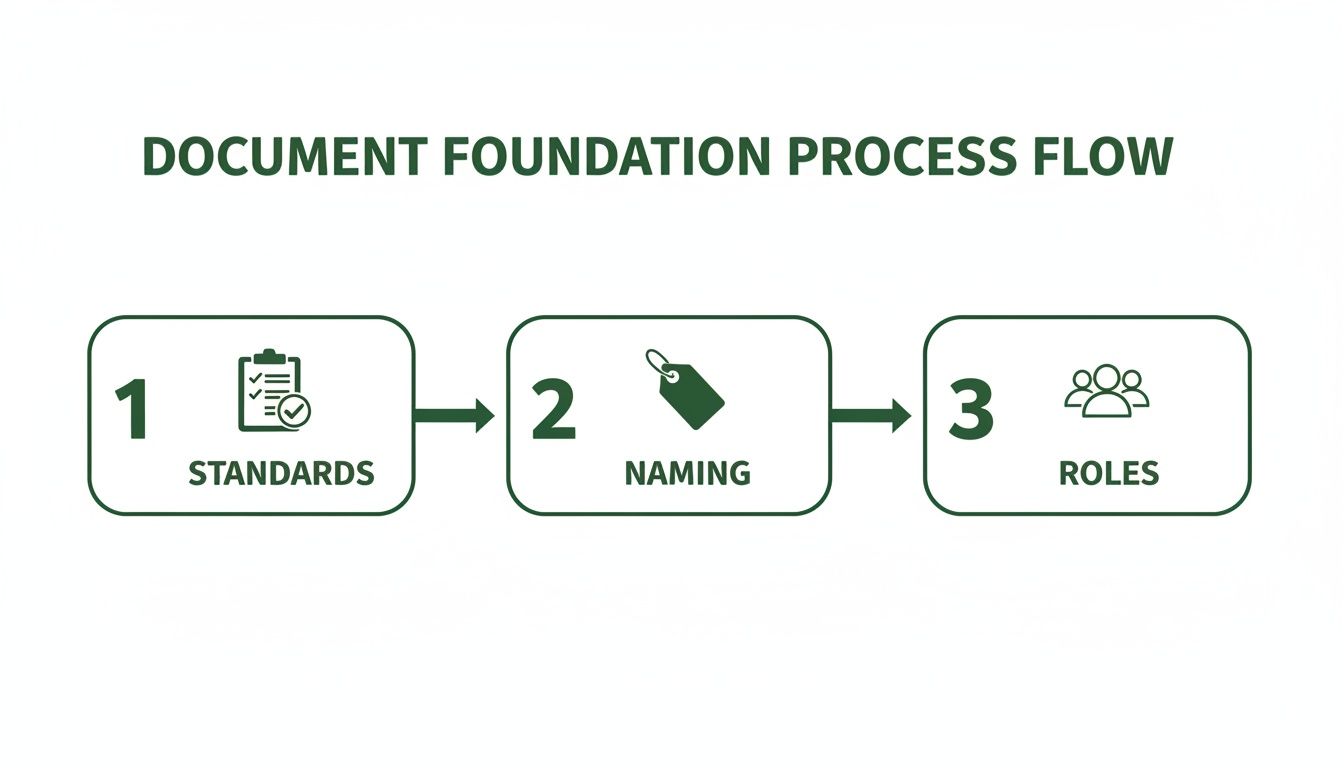
A process flow diagram detailing document foundation steps: Standards, Naming, and Roles.

As you can see, clear standards, consistent naming conventions, and well-defined roles are the sequential building blocks. Get these right, and you're well on your way to creating reliable and efficient processes.

Mapping the RFI Workflow

The humble RFI is the perfect example of a small document with the potential for massive disruption. An unclear drawing detail or a conflict in the specs can bring an entire crew to a grinding halt. A sloppy, informal RFI process just pours salt in the wound, letting that simple question fester for days or even weeks.

A robust RFI workflow has to clearly define every single step of the journey:

  1. Initiation: The process kicks off when a subcontractor or site supervisor spots a problem. They submit the RFI through a central system, making sure to reference the exact drawing number and location. No vague questions allowed.
  2. Initial Review: The GC's project manager immediately vets the RFI for clarity and legitimacy. Is this a real issue, or could the answer be found by simply re-reading the existing documents?
  3. Assignment: The PM then routes the RFI to the right person—usually the architect or a specific engineering consultant. An automated notification goes out with a firm deadline for a response.
  4. Response & Review: The architect or engineer provides a definitive answer. Crucially, that response comes back to the PM first, who confirms it actually resolves the issue before it goes any further.
  5. Distribution & Closure: The official response is logged and automatically pushed out to everyone impacted by the clarification, including the person who asked in the first place. The RFI is then formally closed, creating a permanent, traceable record.

This structured path builds in accountability and turns what could be a major delay into a routine clarification.

Streamlining the Submittal Process

Submittals are all about getting the green light on materials and equipment so you can get them ordered on schedule. A disorganized submittal process is a direct threat to your project timeline, especially when it comes to long-lead items.

Your workflow for submittals—covering everything from shop drawings to product data sheets—needs to be just as methodical.

  • Submission: The subcontractor uploads their complete submittal package into the project’s DMS. This is immediately logged against a predefined submittal register that keeps everyone honest about due dates.
  • GC Review: The project manager or engineer does the first pass, checking to ensure the submission actually complies with the contract documents.
  • Design Team Review: Once it clears the GC, the package is forwarded to the architect and relevant engineers for their formal review and stamp.
  • Action & Return: The design team sends the submittal back with a clear, non-negotiable status: "Approved," "Approved as Noted," "Revise and Resubmit," or "Rejected."
  • Final Distribution: The official, stamped submittal is distributed back to the subcontractor, giving them the official go-ahead to start procurement.

I once worked on a project where a two-month delay on window delivery was traced back to a submittal package just sitting in an architect's inbox, unforwarded. A simple, transparent workflow with automated reminders would have saved tens of thousands of dollars in schedule impacts.

Taming the Change Order Workflow

Nothing hits a project's budget and schedule quite like a change order (CO). Because of their serious financial and legal weight, COs demand a workflow with an ironclad audit trail. The whole process must be transparent, efficient, and leave absolutely no room for misinterpretation.

The journey of a change order should be meticulously tracked from start to finish:

  1. Identification: The need for a change is identified, often sprouting from an RFI response, a direct owner request, or an unforeseen condition discovered on site.
  2. Pricing: The GC immediately requests pricing for the proposed change from every subcontractor who will be affected.
  3. Review & Assembly: All the costs are compiled by the GC, who reviews them for fairness before assembling the formal Change Order proposal for the owner and architect.
  4. Approval: The owner and architect review the CO. This stage can often involve some back-and-forth negotiation before a final signature is secured.
  5. Execution: Once the CO is fully executed, it’s distributed to all parties, and the accounting department is notified to officially adjust the contract value.

If you want to dig deeper into the nuts and bolts of setting these up, check out a comprehensive guide to documentation workflow management for more best practices. By creating these clear, logical, and repeatable processes, you build a system that crushes bottlenecks before they even form and keeps the entire team communicating seamlessly.

Selecting and Implementing Your Digital Toolkit

A construction worker uses a phone next to a laptop displaying construction plans and a blue hard hat on a wooden table.

Making the leap from overflowing binders and messy shared drives to a dedicated Document Management System (DMS) is one of the most powerful moves you can make. This isn't just about saving paper; it’s about giving your project a central nervous system. The right digital toolkit provides your entire team with a single, reliable source of truth they can access from anywhere.

The first step, and it's a big one, is picking the right DMS. The market is flooded with options, but a handful of core features are absolutely non-negotiable for any serious construction documentation management platform. Without them, you're just swapping one messy system for another.

Non-Negotiable DMS Features

Your shopping list should start with features that solve real-world problems on the job site. You're not looking for a digital filing cabinet—you need an active project partner.

Here’s what to insist on:

  • Cloud-Based Access: Your documents need to live in the cloud, not on a server in a back office. This is the only way the PM on-site, the architect at their desk, and the owner across the country can all be confident they're looking at the same file.
  • Mobile-First Capability: So much of the real work happens in the field. If your team can't pull up the latest drawings or submit an RFI from a tablet or smartphone, the system is fundamentally broken.
  • Powerful Search Functions: Wasting 10 minutes digging for a specific submittal is 10 minutes of lost productivity. A quality DMS has robust search tools that let you find any document in seconds using keywords, dates, or metadata.
  • Automated Version Control: This is the feature that single-handedly stops rework. The system must automatically archive old versions and push the current, approved document to the forefront. It’s the best way to prevent a crew from building off an outdated plan.

I consulted on a project that was bleeding money from rework. The root cause? Version confusion between two key subcontractors. Implementing a DMS with automatic version control immediately solved the problem, saving them an estimated $50,000 on that project alone by preventing just one major mistake.

When choosing a DMS, it’s helpful to compare what's out there. The right features can make or break your project's flow.

Key Features of a Modern Construction DMS

Feature Description Impact on Project Efficiency
Cloud-Based Access & Mobile App Allows real-time access to all documents from any device, anywhere. Eliminates delays waiting for information from the office; decisions can be made instantly on-site.
Automated Version Control Automatically archives old document versions and ensures only the current one is accessible. Drastically reduces the risk of costly rework from using outdated plans or specifications.
Customizable Workflows Enables setting up automated approval processes for RFIs, submittals, and change orders. Speeds up review cycles and ensures no document gets lost in someone's inbox.
Robust Search & OCR Powerful keyword search, metadata tagging, and Optical Character Recognition (OCR) for scanned docs. Finds any document in seconds, saving hours of manual searching and boosting productivity.
Integration Capabilities Connects seamlessly with project management software, BIM platforms (e.g., Revit), and accounting systems. Creates a single source of truth, breaks down data silos, and reduces double-entry.
Role-Based Permissions Allows granular control over who can view, edit, and approve specific documents and folders. Protects sensitive information and simplifies the user interface by only showing relevant data.

Looking at a table like this makes it clear: a modern DMS is less about storage and more about actively managing the flow of information to keep your project moving forward.

Structuring Your Digital Filing System

Once you've picked your tool, you have to bring some order to the chaos. Don't just drag and drop your existing mess of folders into the new system. This is your chance to build a logical, scalable structure from the ground up.

Start with top-level folders that mirror your project's lifecycle. A simple, effective setup might look like this:

  1. 01-Contracts & Legal
  2. 02-Permits & Compliance
  3. 03-Design Documents
  4. 04-Submittals & Shop Drawings
  5. 05-RFIs & Change Orders
  6. 06-Safety & Inspections
  7. 07-Project Photos
  8. 08-Closeout Package

Inside each of these, create subfolders organized by discipline (Architectural, Structural, MEP) or by subcontractor. The key is consistency. Whatever structure you decide on, apply it to every single project without exception.

Integrating for a Single Source of Truth

A standalone DMS is good, but an integrated one is game-changing. The real magic happens when your document system communicates with your other critical software, especially your Building Information Modeling (BIM) and project management platforms like Procore or Autodesk Construction Cloud.

This integration creates that elusive "single source of truth." When an RFI is logged in your PM tool, the related documents in the DMS are automatically linked. When a change is made in the BIM model, the updated drawings get pushed to the DMS, and everyone is notified. This interconnectedness shatters data silos and ensures every decision is based on complete, current information.

As we move through 2025, artificial intelligence is taking this even further. AI is set to automate up to 70% of routine documentation tasks like sorting files and checking for compliance. Modern systems using optical character recognition (OCR) and natural language processing (NLP) can scan a handwritten form, figure out what it is, and route it to the right person for approval. This technology is already cutting human error rates from 15-20% down to under 2%. To dig deeper into this, you can find additional insights on efficient construction document management.

Driving Adoption Through Training and Permissions

The final piece of the puzzle is your people. You can invest in the best system in the world, but it's worthless if no one uses it correctly. Getting this right comes down to two things: smart permissions and hands-on training.

Set up role-based permissions from day one. Your subcontractors should only be able to see and upload to their specific folders. Project managers need wider access, while owners might get view-only rights to key financial and progress documents. This not only protects sensitive information but also keeps the interface clean and simple for each user.

Finally, train your team. I don’t mean sending out a memo. Hold a hands-on session where you walk through the core workflows for RFIs, submittals, and daily reports. When you show people exactly how this tool will make their jobs easier, not harder, they'll actually want to use it.

Adapting Your System for Specialized Projects
A man in a blue shirt meticulously reviews and writes on construction blueprints on a wooden table outdoors.

A rigid, one-size-fits-all approach to construction documentation management is a recipe for failure. The core principles of control and access always apply, of course, but the day-to-day realities of a high-rise commercial build are worlds apart from a delicate historic landmark restoration. Every specialized project comes with its own unique risks, regulations, and headaches, demanding a documentation strategy that’s just as specialized.

If you don't adapt your system, you’re guaranteed to miss the critical details that blow up budgets, derail schedules, and lead to compliance nightmares. The real trick is to think through the project's specific documentation needs before you even break ground. That way, you can build a customized framework that's ready for the challenges you know are coming.

Commercial Builds: Taming MEP and Subcontractor Chaos

Large-scale commercial jobs are beasts of complexity. The sheer volume of subcontractors and the intricate dance of Mechanical, Electrical, and Plumbing (MEP) systems can be overwhelming. Your documentation system has to be a well-oiled machine, capable of handling a flood of submittals, RFIs, and coordination drawings without grinding to a halt.

For these projects, it's all about seamless information flow and clash detection. Your strategy needs to focus on:

  • Dedicated MEP Submittal Tracking: Don't just dump everything into one folder. Create specific, clearly labeled folders for every single MEP component, from air handlers to switchgear. Your submittal log should track more than just an approval status—it needs to include fabrication and delivery lead times.
  • Airtight Coordination Drawing Versions: With so many trades squeezed into tight spaces, version control for coordination drawings is non-negotiable. Your system must make it painfully obvious which BIM model and composite drawings are the most current to prevent incredibly expensive on-site clashes.
  • Streamlined Subcontractor Onboarding: Set up a standard digital package for every new sub. This should include direct links to the current drawing set, project-specific safety protocols, and the reporting templates you expect them to use. Consistency from day one is key.

Here's a classic mistake on big commercial jobs: treating all submittals as equals. A submittal for the lobby tile simply doesn't have the same urgency as the one for a custom-fabricated electrical panel with a 20-week lead time. Your system has to be smart enough to flag and fast-track these critical-path items.

Adaptive Reuse: Documenting the Great Unknown

Adaptive reuse projects—like turning an old warehouse into loft apartments—are all about managing discovery. You’re not starting with a clean slate; you're starting with a building full of secrets hidden behind walls and under floors. In this scenario, your documentation system has to become a living, breathing log of every discovery and decision made along the way.

The name of the game is meticulously documenting existing conditions and tracking every single change as unforeseen issues pop up.

  • The Existing Conditions Report: This is your project bible. Use a mix of 3D laser scans, heavily annotated photos, and detailed field notes to create an exhaustive baseline before a single wall comes down.
  • A "Discovery" RFI Workflow: Create a specific RFI category just for unforeseen conditions. This special workflow should immediately ping the owner, architect, and structural engineer to get a solution hammered out fast.
  • The Materials Log: Document everything you find. Some materials might be hazardous (like asbestos or lead paint) and require detailed abatement records. Others might be salvageable for reuse, which can impact both the budget and sustainability goals.

The success of an adaptive reuse project often comes down to how quickly the team can document a surprise, figure out a solution, and get it approved. A slow or messy process here will bring the entire job to a standstill.

Historic Preservation: A Masterclass in Detail and Compliance

Working on a historic preservation project is a whole different ballgame. The guiding principle is protecting the building's historical integrity, which means every move is scrutinized by preservation boards, historical commissions, and government agencies. Your documentation has to be ironclad—the undeniable proof of your compliance and craftsmanship.

Your system transforms into a detailed, historical record of the entire process.

  • Meticulous Materials Research and Matching: You'll need to create detailed files for every original material, complete with research on historical construction methods. When you propose a new material as a match, the submittal must include side-by-side photo comparisons and spec sheets that justify your choice beyond any doubt.
  • Formal Mock-Up Approvals: Before you touch a large area—say, repointing a brick facade or restoring original windows—you must document the creation and formal approval of physical mock-ups. Use time-stamped photos and get actual signatures on approval forms.
  • Bulletproof Tax Credit Documentation: Many of these projects are funded by historic tax credits. Your document system absolutely needs a dedicated section to organize every application, report, and piece of correspondence required to secure and maintain that crucial funding.

On projects like these, your documentation system is far more than an organizational tool. It's a critical risk management asset that actively protects your budget, your schedule, and your company's reputation.

Managing Legal Compliance and Long-Term Retention

So, the punch list is done, the owner has the keys, and everyone’s celebrating a successful project. You might think it’s over, but for your project documents, their most important job is just beginning. Every contract, change order, RFI, and safety log now shifts from being an active project tool to a permanent legal record.

Thinking about long-term storage isn’t just about digital housekeeping. It's a core part of your company's risk management strategy.

A clean, easy-to-search archive is your single best defense if a claim, warranty issue, or lawsuit pops up down the road. Imagine getting a call three years from now about a supposed material failure. Without a clear, auditable trail of approved submittals and correspondence, you're digging through old hard drives and emails, trying to prove you did everything right. With a solid construction documentation management system, you can pull that proof in minutes.

This isn't a niche concern anymore. The document management services industry in the US hit $8.7 billion in 2025, largely because construction firms are getting serious about handling their mountain of paperwork. You can see more on the document management market on ibisworld.com.

How Long Do You Really Need to Keep This Stuff?

Knowing what to keep is one thing; knowing how long to keep it is another. While the rules can differ by state and contract, there are some solid industry standards that should form the baseline of your retention policy. Get this wrong, and you could be facing serious legal and financial heat.

The main drivers here are the statutes of limitation and statutes of repose. The first sets a deadline for filing a lawsuit after damage is discovered. The statute of repose, which is often more critical in construction, sets a hard-and-fast deadline from the project’s completion date, no matter when a defect is found.

Here’s a quick-and-dirty guide for how long to hang onto key documents:

  • Contracts and Change Orders: These are the legal heart of the project. Plan on keeping them for at least 10 years post-completion, but check your state’s statute of repose and go with whichever is longer.
  • As-Built Drawings and Specs: This is the final word on what was actually built. 10 years is the standard best practice here.
  • Safety Records (OSHA Logs, etc.): Don't guess on these. Regulatory bodies have their own rules. OSHA, for instance, requires you to keep injury and illness records for 5 years.
  • Warranties and Closeout Docs: The simple rule here is to keep them for the entire duration of the longest warranty period, which can easily be several years.

A well-structured digital archive becomes your corporate memory. It ensures that the critical knowledge from a project doesn't walk out the door when a project manager retires or moves on.

Archiving and Retrieval That Actually Works

Let's be clear: dragging a bunch of files into a folder named "Archive" isn't a strategy. The real goal is to build a secure, searchable archive that a complete stranger could navigate ten years from now. Your digital closeout package should be a perfectly organized, self-contained history of the project.

First, lock it down. Once a project is officially closed out, the archive should become read-only. This prevents accidental changes or deletions and preserves the integrity of the record. Storing this final archive in a secure cloud environment with redundant backups is non-negotiable—it protects you from catastrophic data loss.

This is where all that hard work you put into your file naming and folder structure at the beginning of the project really pays off. When everything is consistent, anyone in your company should be able to find a specific RFI from six years ago based on the file name alone. That’s how you build a durable and, most importantly, defensible project history.

Common Questions About Construction Documentation

When you're knee-deep in a project, questions about managing paperwork are bound to come up. It's especially true when you're shifting from the old-school paper trail to a more organized digital system. Here are some of the things project managers and contractors ask us most often.

What's the Single Biggest Mistake People Make with Document Control?

Hands down, the most common and costly error is not having a single source of truth. It’s a classic problem: drawings live in a dozen different places. You've got some on the main server, a few more floating around as email attachments, and the superintendent has a critical set saved directly to their laptop.

This kind of fragmentation is a recipe for disaster. Sooner or later, someone will build off an outdated drawing. That one mistake can lead to significant rework, blowing the budget and throwing the schedule completely off track. A centralized Document Management System (DMS) is the only way to guarantee that everyone—from the architect to the field crew—is looking at the exact same, most current file.

How Can I Get My Field Teams to Actually Use the New System?

Field adoption is everything, and it boils down to two things: simplicity and mobile access. If your foreman has to pinch and zoom on a tiny phone screen or navigate through ten menus just to find a drawing, they’ll go right back to their paper copies. You have to choose a system with a clean, intuitive mobile app that works well on a tablet.

Training is the other piece of the puzzle. Skip the corporate overview and get right into practical, hands-on sessions that mirror their daily tasks. Show them exactly how to:

  • Pull up the latest drawing set on their tablet.
  • Snap a few photos and attach them to a daily report right from their phone.
  • Find the most recent RFI response without having to call the office.

When you prove the tool makes their job easier, not harder, they'll get on board.

The moment a site superintendent can pull up a specific submittal in 30 seconds to answer a subcontractor's question on the spot, they're sold. The value becomes real, saving them time and preventing a costly mistake before it happens.

What's the Best Way to Name Construction Files?

There's no single magic formula, but consistency is king. The goal is to create a logical, descriptive structure that makes every file instantly searchable and understandable. A solid naming convention is your first line of defense against digital chaos.

We've found a format that includes a few key identifiers works wonders:

ProjectNumber-Discipline-DocumentType-Description-Date

For instance, a file named 2401-ARC-DWG-L2_FloorPlan-20251105.pdf tells you everything you need to know at a glance. It's for project 2401, it's an architectural drawing of the second-floor plan, and it was issued on November 5, 2025. This disciplined approach makes finding any document quick and foolproof.

Isn't a DMS Just a Fancier Version of Dropbox?

That's a common misconception. While tools like Google Drive or Dropbox are great for basic file sharing, they aren't true document management systems. They just don't have the construction-specific features you need to manage risk and maintain control over the project.

Here’s a quick breakdown of the key differences:

Feature Cloud Storage (e.g., Dropbox) Construction DMS
Version Control Manual; easy to overwrite files. Automatic; archives all old versions.
Workflows None; relies on manual emailing. Built-in and automated for RFIs, submittals.
Permissions Basic folder-level access. Granular, role-based security controls.
Audit Trails Limited tracking of views/downloads. Detailed, unchangeable logs of all actions.

Think of it this way: a dedicated DMS is an active project management tool that enforces your processes. Cloud storage is just a passive digital filing cabinet.


At Sherer Architects, LLC, we build our success on a foundation of meticulous planning and flawless execution, where superior document control is non-negotiable. Whether you are developing a commercial property, pursuing an adaptive reuse project, or preserving a historic landmark, our decades of experience ensure every detail is managed with precision. Let us bring structure and clarity to your next project.
Start your project with us today

Categories
Uncategorized

Mastering Construction Change Order Management

Handling change orders is the formal dance of documenting, reviewing, approving, and putting into action any shift from a project's original contract. It's the essential framework that keeps a project's scope, schedule, and budget in check, making sure everyone involved is on the same page.

Why Change Orders Are an Inevitable Part of Construction

Let's clear up a common misconception right away: change orders aren't a sign that someone messed up. In reality, they are a normal and necessary part of every single construction project. They're simply the mechanism for controlled evolution. The first step toward mastering the process is to stop seeing them as crises and start treating them as manageable events.

Changes pop up for all sorts of reasons. It could be the client suddenly wanting a higher-grade finish for the lobby flooring, or the excavation crew hitting an unexpected layer of bedrock that forces a redesign of the foundation. These kinds of adjustments aren't just common—they're practically guaranteed.

From Obstacles to Opportunities

If you think of every change order as an obstacle, you’re setting yourself up for a confrontational project. Experienced project managers know better. They go into a job expecting changes because they understand the initial blueprint is a well-informed starting point, not the final word set in stone.

This shift in mindset is everything. When a team is prepared for change, a new request doesn't cause panic. Instead, it triggers a calm, documented process. You move from a reactive "firefighting" mode to a proactive "solution-managing" one.

A well-managed change order is simply a documented conversation that protects the owner, the architect, and the contractor. It clarifies expectations and ensures fair compensation for new work, turning a potential point of conflict into a moment of structured collaboration.

The numbers don't lie. Research from the American Institute of Architects (AIA) looked at over 18,000 projects and found that 100% of them had at least one change order. The bigger the project, the more changes you can expect—smaller jobs averaged 1.7 change orders, while larger ones had nearly 12. You can dig into the AIA's findings to see how project scale and other factors come into play.

Ultimately, successful change order management comes down to having a solid system in place. A good process can absorb these modifications without derailing the entire project. The table below breaks down some of the most common triggers and what they typically mean for your schedule and budget.

Common Triggers for Construction Change Orders and Their Impact

This table breaks down the most frequent reasons change orders are initiated and the corresponding effects they have on project timelines and budgets.

Change Order Trigger Description Typical Impact on Schedule Typical Impact on Cost
Owner-Requested Changes The client decides to add, remove, or alter a feature after the contract is signed (e.g., upgrading materials, changing a room layout). Moderate to High Moderate to High
Errors or Omissions Mistakes or missing details in the original plans and specifications are discovered during construction. High High
Unforeseen Site Conditions Unexpected issues are found on-site, such as poor soil quality, hidden utilities, or hazardous materials. Moderate to High Moderate to High
Design Changes The architect or engineer refines the design to improve functionality, aesthetics, or performance. Low to Moderate Low to Moderate
Material/Labor Availability A specified material becomes unavailable or delayed, or there's a shortage of skilled labor, requiring substitutions. Moderate Low to Moderate
Code Revisions A building code or regulation changes after the project has started, forcing a design or construction adjustment. Low to Moderate Low to Moderate

Understanding these common triggers is the first step. With this context, we can now dive into the practical strategies and workflows needed to manage them effectively.

Building a Bulletproof Change Order Workflow

Flying by the seat of your pants with change orders is a sure-fire way to blow your budget, wreck your schedule, and sour relationships. Instead of reacting to every little shift, the pros build a structured, repeatable workflow. This isn't about adding red tape; it's about creating a clear and predictable path that protects everyone involved when things inevitably change.

The whole process kicks off the second someone spots a potential deviation from the contract. Catching it early is everything. A sub who notices a clash between the prints and what's actually on-site, or an owner who casually mentions a "small idea" they just had—both are triggers that need to be captured and documented right away. Ignoring these whispers is how a tiny tweak snowballs into a major project headache.

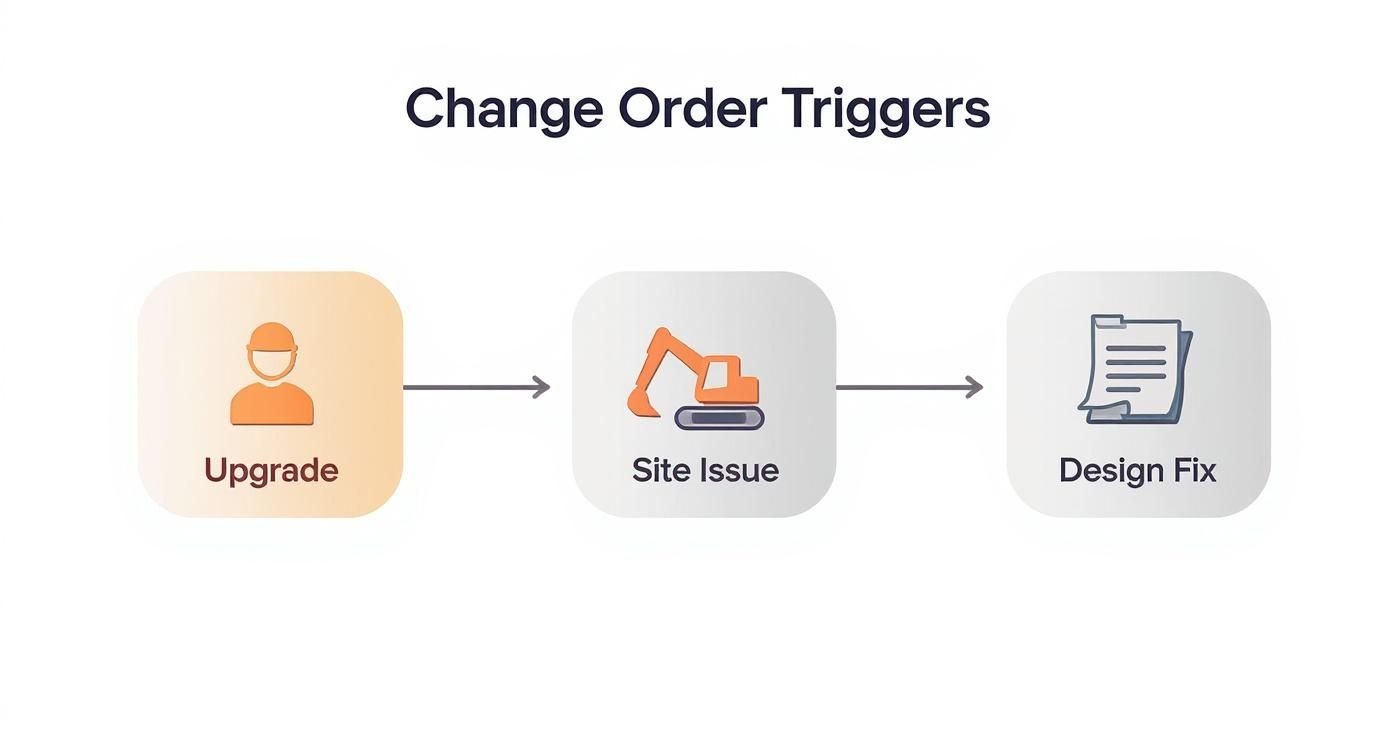
Most of the time, change orders bubble up from one of a few common sources: the client wants an upgrade, the site throws you a curveball, or there's an error or omission in the design that needs fixing.

Flowchart illustrating three common triggers for construction change orders: Upgrade, Site Issue, Design Fix.

As you can see, changes can come from anywhere—client inspiration, real-world discoveries, or a simple blueprint correction. Each one needs to be managed through the same steady, consistent process.

Crafting an Undeniable Change Order Request

Once you've identified a potential change, you need to formalize it with a Change Order Request (COR). Think of this document as your opening argument. A sloppy, half-baked COR is an invitation for pushback and delays. A well-crafted one greases the wheels for a smooth approval.

A truly solid COR does more than just say what's changing; it builds an airtight case. Here’s what it must include:

  • A Detailed Scope: Get specific. "Relocate wall" isn't going to cut it. You need something like, "Relocate the north wall of Office 101 three feet east. Scope includes demolition of existing wall, new steel stud framing, GWB on both sides, Level 4 finish, prime and two coats of paint to match existing, and relocation of two (2) electrical duplex outlets and one (1) data port."
  • Clear Justification: You have to explain why this is necessary. Is it an owner directive? A response to an unforeseen condition? Reference the specific RFI, drawing number (e.g., A-2.1), or meeting where the change was discussed. This context is critical.
  • A Transparent Cost Breakdown: This is non-negotiable. Break down the costs for materials, labor (with rates and estimated hours), equipment, and any sub-tier contractor quotes. Your markup for overhead and profit, typically a standard 10-15%, should have already been defined in the prime contract.
  • A Realistic Schedule Analysis: Don't just guess how much time it will add. The COR needs to clearly state the impact on the project timeline, showing exactly how many days are needed and how this change affects other critical path activities.

Navigating the Approval and Integration Process

With your rock-solid COR in hand, it's time for negotiation and approval. This shouldn't feel like a battle. When you present clear, thorough information, you’re not arguing; you're collaborating with the owner and architect to make an informed decision. Get the COR to them quickly, walk them through it, and be ready to explain the cost and schedule impacts.

The best negotiations happen when there's a foundation of trust and transparent data. A well-documented COR shifts the conversation away from haggling over price and toward collaboratively solving a problem for the good of the project.

Once the COR is signed by all the right people, it officially becomes a Change Order. But you're not done yet. The final, and most frequently missed, step is to weave that approved change back into the project's DNA.

This means taking several key actions immediately:

  1. Update the Contract: The change order is a legal amendment. It needs to be formally logged, numbered, and filed with the original contract documents.
  2. Adjust the Budget: The project's master budget must be revised right away to reflect the new contract value.
  3. Revise the Master Schedule: Any time extension from the change order has to be incorporated into the project schedule, pushing out milestones and the completion date accordingly.
  4. Distribute the Information: Get the approved change into the hands of the people who need it. The superintendent, the foreman, and the specific subs doing the work all need the updated drawings, specs, and direction.

Skipping this final integration phase is a rookie mistake. An approved change order that lives in a folder but not in the master plan creates chaos on site. It’s the very thing this workflow is designed to prevent. A bulletproof process follows the change from the first spark all the way to seamless execution in the field.

Clarifying Roles to Prevent Project Gridlock

Nothing grinds a project to a halt faster than confusion over a change order. When a change request lands and nobody's quite sure who owns the next step, you get a classic case of finger-pointing, missed emails, and delays that bleed money. A solid change order process isn't just about forms and software; it’s about people knowing exactly what they’re supposed to do and when.

Ambiguity is the enemy of progress on a job site. If roles aren't crystal clear from the pre-construction meeting, a simple owner request can trigger a chain reaction of chaos. The owner might think a verbal "go-ahead" is enough, the architect could sit on a technical review for a week, and the general contractor is left stuck in the middle, unable to price the work or direct their subs.

This kind of gridlock is entirely preventable. By defining and communicating each stakeholder's role before the first change order ever appears, you build a system of accountability. Everyone knows their part, from initiation to execution.

The Owner and The Architect

The Owner is the ultimate decision-maker. They're the one who typically initiates or must approve any change that impacts the budget or the timeline. Their most critical responsibility? Providing clear, timely decisions. A "maybe" or a delayed response has a serious ripple effect, holding up material procurement and scheduling for multiple trades down the line.

The Architect or Engineer is the technical authority. Their main job is to review a proposed change for design intent, code compliance, and sheer feasibility. They're the ones who ensure that a requested modification fits the overall project vision and won't create some unintended structural or MEP conflict. Their swift and thorough review is what keeps the process moving.

Think about a common scenario: an owner decides they want to add a large window to an exterior wall.

  • The Owner formally submits the request, usually to the GC.
  • The GC immediately forwards it to the Architect for a technical review.
  • The Architect has to verify if the change is structurally sound, how it affects the building envelope's performance, and if it still meets energy codes before giving a technical green light.

A delay on the architect’s desk can stall the entire process before anyone even talks about price.

The General Contractor and Subcontractors

The General Contractor (GC) is the central hub of the entire change order process. Think of them as the conductor of the orchestra. They're responsible for receiving the initial request, coordinating with the design team, and—most importantly—pricing the work and figuring out the real impact on the schedule. The GC gathers quotes from all affected subcontractors, compiles them into a comprehensive Change Order Request (COR), and presents the complete package to the owner for a final decision.

The Subcontractors are the boots on the ground, the specialists who provide the real-world cost and time estimates for their specific trades. When a GC asks for a price on a change, the subs have to respond quickly and accurately. Their input is the foundation of the whole COR; without it, the GC can't give the owner the complete picture. This is why clear, detailed communication from the GC to the subs is so vital—it prevents pricing errors and misunderstandings about the scope.

A well-defined responsibility matrix, often called a RACI chart, is one of the most powerful tools a project team can use. It strips away all the guesswork by mapping out exactly who is Responsible, Accountable, Consulted, and Informed for every step of the change order lifecycle.

To clear up any confusion from the start, we use a responsibility matrix like the one below. It's a simple but effective way to ensure everyone is on the same page.

Change Order Responsibility Matrix (RACI Chart)

Task/Decision Point Owner Architect/Engineer General Contractor Subcontractor
Identifies Need for Change R C C C
Submits Formal Request for Change A C R I
Reviews for Design & Technical Feasibility C A R C
Develops Scope & Gathers Sub Quotes I C A R
Prepares Cost & Schedule Impact Analysis I C A R
Submits Formal Change Order Request (COR) C I A I
Approves/Rejects Change Order Request A C I I
Issues Executed Change Order A I R I
Updates Contract Documents C R A I
Performs the Changed Work I I A R
Documents & Verifies Completed Change I C A R

This chart isn't just a document to be filed away; it's a living guide that prevents communication from breaking down. It ensures the right people are involved at the right time, turning what could be a contentious process into a smooth, collaborative effort.

By establishing this kind of clarity upfront, you transform change order management from a source of friction into just another structured, predictable part of running a successful project.

Creating Documentation That Stands Up to Scrutiny

When a change order goes sideways and fingers start pointing, your documentation is the only thing that matters. It’s your first, last, and best line of defense against claims, disputes, and costly litigation. Creating records that leave zero room for ambiguity isn’t just good practice; it's a fundamental part of risk management on any job site.

The goal here is to build an ironclad paper trail that tells the whole story of the change from start to finish. Every phone call, every sketch, every decision needs to be captured in a way that an outsider could piece together months—or even years—down the road. A vague note on a napkin or a quick "yeah, go ahead" in the hallway is an open invitation for trouble.

A desk with a plant, a green book, money, a document, and a pen for business records.

Anatomy of a Bulletproof Change Order Form

The foundation of any solid documentation system is a standardized change order form that’s used religiously on every project. While the specific layout can vary, a truly "bulletproof" form has several non-negotiable fields that cut through the noise and create a crystal-clear record. Think of it as your pre-flight checklist for any scope modification.

A robust form absolutely must include:

  • Unique Tracking Number: Simple and sequential (like CO-001, CO-002) so you can find it instantly.
  • Clear Project Identifiers: The official project name, number, and site address. No confusion about which job it belongs to.
  • Detailed Description of Change: This is the heart of the document. You have to spell out exactly what work is being added or removed, referencing specific drawing numbers, spec sections, and RFIs.
  • Justification for the Change: Get to the why. Is this an owner request? A design omission that just surfaced? An unforeseen site condition?
  • Comprehensive Cost Breakdown: The price needs to be transparent. Break it down into labor, materials, equipment, sub costs, and the contractually defined markup for overhead and profit.
  • Schedule Impact Statement: How many calendar days will this add to or subtract from the completion date? If there's no impact, you must explicitly state "zero (0) days" to avoid ambiguity.
  • Signature and Date Blocks: Designated lines for the owner, contractor, and sometimes the architect to formally execute the agreement.

This isn't just a memo; this level of detail turns the form into a legally binding amendment to your original contract.

The Power of the Central Change Order Log

Individual forms are critical, but they're only one piece of the puzzle. The real magic happens when you maintain a central change order log. This master document, whether it's a spreadsheet or a dedicated module in your PM software, gives you a live, at-a-glance dashboard of every single change on the project.

A well-kept log tracks the vitals for every Change Order Request (COR) and executed Change Order (CO).

Log Entry Status Description Cost Impact Schedule Impact
COR-007 Approved Relocate lobby reception desk +$7,250 +3 days
COR-008 Pending Owner Review Add exterior security cameras +$11,400 +5 days
COR-009 In Pricing Upgrade flooring in Break Room TBD TBD
CO-006 Executed Deduct value engineering for lighting -$4,800 0 days

This log becomes an indispensable tool for project managers. It immediately shows the cumulative financial and schedule impact of all changes, prevents items from falling through the cracks, and acts as the single source of truth in owner meetings. Getting a handle on process documentation best practices is what makes the difference between a clean closeout and a messy dispute.

Communication Protocols That Actually Work

Even the best forms and logs are useless if your communication is a disorganized mess. The final piece of the documentation puzzle is establishing clear protocols for how information flows. Effective change management isn’t just about paperwork; it's about making sure the right people are talking at the right time.

Cautionary Tale: A contractor on a mid-rise project moved a series of interior walls after getting a verbal nod from the owner's rep on site. The formal paperwork got pushed to the back burner. When the final invoice hit, the owner balked at the $45,000 charge, claiming they misunderstood the scope. With no signed change order, the contractor was stuck in a months-long legal battle and ended up eating most of the cost.

This is exactly why meticulous, real-time record-keeping is non-negotiable. It’s not about adding bureaucracy—it’s about protecting your bottom line. By combining detailed forms, a central log, and clear communication, you build a fortress of documentation that protects your budget, your schedule, and your business.

Protecting Your Budget and Project Timeline

A change order does more than just tweak the scope—it directly meddles with the financial and scheduling DNA of your project. If you don't have a firm grip on both, even a seemingly minor change can set off a chain reaction of cost overruns and delays, putting the entire job at risk. You have to be proactive and methodical about pricing the change and, just as importantly, analyzing its ripple effects.

The way you price a change order really sets the tone for fairness and transparency. Choosing the right method is critical, and it all comes down to the nature of the work. You wouldn't price a simple light fixture swap the same way you'd price the removal of an unexpected rock ledge discovered during excavation.

Overhead view of a desk with a tablet displaying a budget timeline, watch, calculator, and office supplies.

Choosing the Right Pricing Method

Your contract should spell out the approved pricing methods, but knowing which one to use in a given situation is a skill learned in the trenches. Most scenarios fall under one of three main approaches, and each has its place.

  • Lump Sum: This is your classic fixed price for the whole change. It’s perfect for well-defined adjustments where there are no unknowns, like changing from one specified type of flooring to another. The owner gets cost certainty right away, and the contractor knows exactly what they're getting paid. No surprises.

  • Time and Materials (T&M): When you run into unforeseen conditions or work with a scope you can't pin down, T&M is the only way to go. The contractor bills for their actual labor hours and material costs, plus a pre-agreed markup, which is often in the 10-15% range. This is the go-to for emergency repairs or when trying to estimate the work up front would be pure guesswork.

  • Unit Pricing: This method is a lifesaver for changes that involve quantifiable items where you don't know the final quantity yet. For example, if you hit bad soil and need to over-excavate, you can price the change per cubic yard of soil removed and new fill brought in. It’s a transparent, scalable way to price the work based on an agreed-upon rate.

A rookie mistake is trying to apply one method to every single change. If you try to lump sum an unpredictable task, the contractor could get burned. On the flip side, using T&M for a simple, defined task can make an owner feel like they're signing a blank check. The real skill is matching the method to the situation.

Defending Your Schedule with a Time Impact Analysis

Cost is only half the story. One of the biggest friction points in managing change orders is agreeing on a fair time extension. Just saying, "this will take five more days," won't cut it. You have to prove it. This is where a Time Impact Analysis (TIA) becomes your most valuable ally.

A TIA is a formal analysis showing exactly how a proposed change affects the project's critical path—that sequence of activities that dictates your completion date. This isn’t a gut feeling; it’s a calculated, methodical process.

A Time Impact Analysis turns a subjective argument about delays into an objective, data-backed conversation. It shifts the discussion from "I think we need more time" to "Here is the network logic showing exactly how this change adds seven days to the critical path."

To do a proper TIA, you have to insert the new activities from the change order directly into the project schedule. Then, you link them logically to the tasks that come before and after. When you rerun the schedule calculation, the real impact on the project's end date becomes clear as day. This hard evidence is what gives you leverage.

Negotiating with Confidence and Collaboration

When you walk into a meeting armed with transparent pricing and a solid TIA, you’re prepared for a productive conversation, not a confrontation. The goal isn’t to "win" the negotiation; it's to reach a fair agreement that keeps the project moving forward for everyone.

Here are a few tips I've picked up over the years for getting to that point:

  1. Present Data, Not Demands: Always lead with the facts. Show the owner and architect your cost breakdown and walk them through the TIA schedule. When they can see the logic behind the numbers and the timeline, it’s much harder to argue with the conclusion.
  2. Focus on the Project's Health: Frame the entire conversation around what’s best for the project. Keeping the schedule intact and making sure everyone is compensated fairly for extra work benefits the entire team and maintains momentum on site.
  3. Stay Collaborative: Keep the tone professional and focused on finding a solution. Think of a change order as a shared problem to solve, not a battle to be won. Those relationships are what will carry you through to a successful project completion.

At the end of the day, controlling the impact of changes boils down to process and proof. When you systematically price the work and analytically prove the schedule impact, you protect your budget, defend your timeline, and turn a potential conflict into just another manageable part of the job.

Using Technology and Handling Unique Project Demands

In today's construction world, trying to manage change orders with spreadsheets and email chains is just asking for trouble. It's a recipe for version control nightmares, lost messages, and delays that eat directly into your profit margin. Let's be honest, that manual approach just doesn't cut it anymore.

This is where dedicated construction management software, like Procore or Autodesk Construction Cloud, really shows its worth. These tools take the entire chaotic process and give it structure. A potential change can be logged right from a tablet in the field, which instantly starts a digital workflow. That Change Order Request (COR) is then automatically sent to the right people in the right order—from the PM, to the architect, and finally to the owner for the green light. The best part? Everyone can see exactly where a change stands in real-time. No more chasing people down for an update.

The features that really move the needle for project teams include:

  • Centralized Document Storage: Every RFI, photo, and subcontractor quote gets attached directly to the COR. This creates a single, bulletproof record.
  • Automated Workflows: You can build custom approval chains, which means no step gets skipped and everyone is accountable for their part of the review.
  • Financial Integration: Once a change order is approved, the system can automatically update the project budget, giving you a live, accurate view of your costs.

Special Considerations for Unique Projects

A standardized process is great, but some projects just don't play by the normal rules. I'm talking specifically about adaptive reuse and historic preservation jobs. On these projects, discovering unforeseen conditions isn't a risk—it's a guarantee.

When you're working on old buildings, you're often flying blind with incomplete or nonexistent drawings. You truly have no idea what's behind a wall or beneath a floorboard until you open it up. This level of uncertainty means your standard change order process needs a major adjustment.

On an adaptive reuse or historic preservation project, your contract has to be built for the unknown. You need clear provisions for dealing with unforeseen conditions, pre-agreed markups for T&M work, and a rock-solid process for documenting every discovery. This isn't just good practice; it's essential for managing risk.

Strategies for Managing Uncertainty

Contractors who excel at these unique projects build their entire process around navigating the unknown. The traditional change order model, which treats changes as annoying exceptions, simply fails here. You have to design a system that expects constant discovery and adjustment.

Here are a few tactics that work in the real world:

  • Build Flexibility into the Contract: Start with a contract that openly acknowledges the high likelihood of hidden issues. This means having clear language on how discoveries will be priced, often relying on Time and Materials (T&M) or pre-negotiated unit costs.

  • Conduct Intensive Preliminary Investigations: You'll never find everything, but you can get ahead of major headaches. Invest time upfront in non-destructive testing, GPR scanning, and even some targeted exploratory demolition to identify the big problems before you're deep into construction.

  • Establish a Contingency Protocol: Before the project starts, sit down with the owner and establish a clear plan for using the contingency fund. Define exactly what qualifies as an "unforeseen condition" and create a streamlined approval process for tapping into those funds. This keeps small issues from turning into big delays while you wait for a formal change order to be pushed through.

Answering Your Top Construction Change Order Questions

Even the most buttoned-up process can't account for every twist and turn on a job site. Questions are bound to come up. Let's tackle some of the most common ones that project managers wrestle with.

Can an Owner Refuse to Sign a Change Order?

Absolutely. An owner can, and often will, initially push back on a Change Order Request (COR). This usually boils down to a disagreement over the cost, a request for a time extension, or their belief that the work should have been covered under the original contract scope.

When this happens, your documentation is your best friend. You need to build a rock-solid case backed by hard evidence—think RFIs, photos of the unforeseen conditions, and direct references to the plans and specs. If an owner digs in their heels, you could be heading for a formal dispute. This is precisely why keeping a meticulous, real-time paper trail isn't just good practice; it's your ultimate line of defense.

What Is a Construction Change Directive?

A Construction Change Directive (CCD) is a different animal altogether. It’s essentially a top-down order from the owner or architect telling the contractor to get moving on a change before everyone has agreed on the final cost or schedule adjustment. CCDs are used to keep the project from grinding to a halt over negotiations, especially when the work is on the critical path.

The contractor is bound by the contract to perform the work in the CCD. The financial side of things gets sorted out later, typically formalized into a change order once the dust settles and all the true costs are tallied.

A Change Directive is basically an order to "work now, price it out later." It’s a tool to avoid gridlock but demands that you track every single cost meticulously so you get paid fairly for the work you've done.

How Do You Handle Multiple Small Changes?

It happens all the time: a series of small, related issues pop up in the same area. Instead of drowning in a sea of tiny change orders, the smart move is to bundle them. Group related Potential Change Orders (PCOs) into one consolidated Change Order Request (COR).

For instance, say an owner decides to tweak a single office layout. You can roll the wall relocation, the corresponding electrical moves, and the new flooring patch into one clear COR. This makes life easier for everyone involved in the approval chain. For more complex, on-the-fly issues, tools like augmented reality remote assistance can bring in an expert eye virtually, helping you troubleshoot and prevent a small issue from becoming a major change order.

Bundling keeps the paperwork from getting out of hand while ensuring every last adjustment is documented and signed off on before you proceed.


At Sherer Architects, LLC, we live and breathe the complexities of construction, from the first sketch to the final punch list. Our extensive background in commercial projects, adaptive reuse, and historic preservation gives us the foresight to anticipate challenges and manage change with a steady hand. We focus on building strong partnerships to steer your project away from potential pitfalls and toward well-managed, successful outcomes. If you're looking for a team that knows how to bring structure to life, let's talk. Connect with our team today to see how we can guide your next project to a profitable completion.